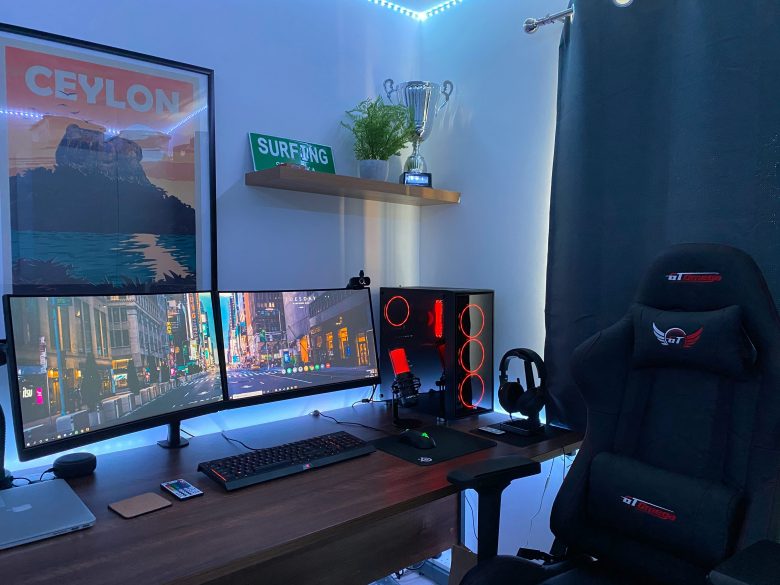
You’re ready to build your ideal gaming setup. But as soon as you check out YouTube or TikTok, you see curved monitors, RGB lights, gaming chairs that look like race car seats, and keyboards that cost more than your rent.
It’s overwhelming. All this gear is designed to make you feel like you need to spend a lot to be a real gamer.
But the truth is, you don’t need to spend $3,000 to have a gaming setup that’s stable, fun, and competitive.
A lot of people end up spending money on the wrong things. They play on a laptop that overheats after ten minutes, but buy a $200 keyboard and a $500 chair. If you want to enjoy games like Valorant, Elden Ring, Fortnite, or The Sims, it’s important to know where your money is going.
The Core Philosophy: Performance Over Aesthetics
If you’re building a budget gaming setup, remember that function should always come before appearance.
It’s easy to get distracted by how things look. Companies spend a lot on advertising ‘gamer’ styles, like sharp edges, black and red colors, and flashing lights. While it’s okay to want your setup to look nice, many new builders make the mistake of choosing looks over how well things work.
Ask yourself this: Would you rather have a simple black PC that runs games smoothly at 144 frames per second, or a colorful PC with lights that lags every time you play?
If you chose the black PC that works well, great job. You’re ready to build a smart and affordable setup.
Part 1: The “Big Three” – Where Your Money Actually Matters
1. The Graphics Card (GPU) – The Engine
If you are building a PC, the Graphics Card is the heart of your gaming experience. It determines how pretty your game looks and how smoothly it runs.
- The Hype: You need the latest RTX 4090 or 4080 to enjoy gaming.
- The Reality: Most gamers don’t need a $1,600 GPU. For 1080p gaming (the standard for most budget setups), cards like the NVIDIA RTX 3060, RTX 4060, or AMD’s RX 6600/6700 XT are absolute workhorses. They run modern AAA titles on high settings without breaking a sweat.
- The Budget Hack: Buy used. The used GPU market is flooded with perfectly functional cards from people who upgrade every year. Just ensure you buy from a reputable seller with buyer protection.
2. The Monitor – The Window
You can have a supercomputer under your desk, but if your monitor is a 10-year-old office hand-me-down, you won’t feel the speed.
- The Hype: You need a 4K, 240Hz, OLED monitor.
- The Reality: For a budget setup, the sweet spot is a 24-inch to 27-inch 1080p monitor with a 144Hz refresh rate.
- 1080p is easier for your GPU to run than 4K.
- 144Hz (or 165Hz) makes movement feel incredibly smooth. Going from 60Hz to 144Hz is a bigger “wow” moment than upgrading your CPU.
- What to look for: An IPS panel for better colors and viewing angles. You can find excellent budget monitors from brands like AOC, ASUS TUF, and ViewSonic for under $150.
3. The CPU & Cooling – The Brain
The CPU handles logic, AI, and physics. If your GPU is the engine, the CPU is the steering wheel.
- The Hype: You need an Intel i9 or AMD Ryzen 9 to game.
- The Reality: For pure gaming, an Intel i5 or AMD Ryzen 5 is the golden standard for budget builds. They offer 90% of the gaming performance of the flagship models for half the price.
- Cooling: You do not need liquid cooling. The “stock” cooler that comes in the box with most AMD and Intel CPUs is perfectly adequate for a budget gaming setup. Spend the $50 you saved on a better GPU.
Part 2: Peripherals – The “Essentials vs. Hype” Breakdown
Once you have your core PC and monitor sorted, it’s time to look at the things you touch: the keyboard, mouse, and audio. This is where the marketing hype is the loudest.
The Keyboard
The Hype: You need a $200 custom mechanical keyboard with custom switches and coiled cables. The Reality: While mechanical keyboards feel nice, they are not a performance necessity for most gamers.
- Budget Approach: A solid, reliable membrane keyboard for $20–$30 is fine. If you want mechanical, there are fantastic budget mechanical keyboards (like the Redragon K552 or Keychron C1) for $40–$60 that will last you for years.
- What Actually Matters: That the keyboard is comfortable for your wrists and doesn’t have “ghosting” (where pressing three keys at once doesn’t register). Almost any modern USB keyboard solves this.
The Mouse
The Hype: You need a lightweight, honeycomb-shelled mouse with 20,000 DPI. The Reality: DPI (dots per inch) above 3,200 is mostly marketing fluff. Most pro gamers play between 400 and 1600 DPI.
- What Actually Matters: Shape and sensor reliability.
- If the mouse doesn’t fit your hand size (palm grip vs. claw grip), you will develop wrist pain.
- You don’t need a $150 mouse. Brands like Logitech (G305), Razer (DeathAdder Essential), and SteelSeries (Rival 3) offer excellent wired and wireless options in the $30–$50 range that are used by esports professionals.
Audio (Headset vs. Headphones)
This is arguably the biggest scam in the gaming industry. “Gaming Headsets” are often overpriced for the sound quality they provide.
- The Hype: You need a “7.1 Surround Sound” gaming headset.
- The Reality: “7.1 Surround Sound” in a headset is software trickery. Good stereo sound actually gives you better directional audio (footsteps) than gimmicky virtual surround sound.
- The Budget Hack:
- Option A: Buy a decent pair of studio headphones (like the Philips SHP9500 or Audio-Technica ATH-M20x) and attach a separate V-Moda BoomPro microphone. This usually costs less than a high-end “gaming” headset and sounds significantly better.
- Option B: If you need a simple all-in-one, the Logitech G432 or HyperX Cloud Stinger are budget kings that outperform headsets double their price.
Part 3: The Chair – Why “Racing Style” is a Trap
If there is one item that perfectly encapsulates the “hype vs. reality” battle in a gaming setup on a budget, it is the gaming chair.
The Hype: You need a bucket-style “racing” chair to be a serious gamer. The Reality: Racing chairs are designed for cars to hold you in place during high-G-force turns. You are sitting still at a desk. These chairs are often stiff, poorly padded, and cause back pain over long sessions.
What Actually Matters: Ergonomics.
For the same price (or less) than a branded “gaming” chair, you can buy a used or entry-level office ergonomic chair.
- The Winner: Look for a used Steelcase Leap, Herman Miller Aeron, or even a brand new Staples Hyken Technical Mesh Chair.
- Why: Mesh backs provide breathability (no more sweaty back). Lumbar support protects your spine. Adjustable armrests ensure your shoulders aren’t hunched.
If you are on a strict budget, a simple wooden dining chair with a $20 memory foam cushion is better for your posture than a cheap, faux-leather “gaming” chair that will start peeling within a year.
Hype vs. High-Value Budget Picks
To make this easier, here is a quick reference guide for your gaming setup on a budget.
| Component | The Hype (Avoid) | The High-Value Budget Pick | Why It Wins |
|---|---|---|---|
| GPU | Latest-gen Flagship (RTX 4090) | Used RTX 3060 / RX 6600 | Delivers 1080p/1440p performance for 1/3 the price. |
| Monitor | 4K, 240Hz, OLED | 24″ 1080p, 144Hz IPS | The “sweet spot” for clarity, smoothness, and GPU compatibility. |
| Keyboard | Custom Mechanical ($200+) | Redragon K552 or Logitech G413 | Mechanical feel/durability without the luxury price tag. |
| Mouse | Ultra-lightweight w/ high DPI | Logitech G305 (Wireless) | Reliable sensor, great battery life, comfortable shape. |
| Headset | “7.1 Surround Sound” | Philips SHP9500 + V-Moda Mic | Superior sound quality and mic clarity for less money. |
| Chair | Racing Style (PU Leather) | Used Steelcase Leap / Staples Hyken | Ergonomic support that prevents back pain; lasts decades. |
Common Mistakes That Drain Your Budget
Even with the best intentions, it is easy to fall into traps. Here are three mistakes people make when building a gaming setup on a budget.
Mistake 1: Skimping on the Power Supply Unit (PSU)
This is the opposite of the usual advice. People buy a $20 “no-name” power supply to save money so they can afford RGB fans.
- Why it’s bad: A cheap PSU can fail catastrophically, frying your motherboard, GPU, and hard drives. It is a fire hazard.
- The Fix: Always buy a power supply from a reputable brand (Corsair, EVGA, Seasonic) with at least an 80+ Bronze rating. This is not where you save money.
Mistake 2: Over-Investing in RGB
RGB fans, RGB strips, RGB RAM—it adds up fast. You can easily spend $100+ just on lighting.
- The Fix: Focus on airflow first. Standard black fans that move air efficiently cost a fraction of RGB fans. You can always add a $15 LED strip later if you want ambiance.
Mistake 3: Buying “Gamer” WiFi
Many “gaming” routers and WiFi adapters are just standard hardware with a markup.
- The Fix: If you can’t use an Ethernet cable (which is always best), a standard mesh router system or a simple PCIe WiFi card is perfectly fine. Look for WiFi 6 support, not “gaming” branding.
Step-by-Step: Building Your Budget Gaming Setup
Let’s consolidate everything into a simple roadmap. If you follow these steps, you will maximize your performance per dollar.
- Set a Total Budget: Let’s say $800 (excluding the desk).
- Allocate 50% to the Tower (PC): Spend roughly $400-$500 on the PC itself. Focus on a balanced CPU (Ryzen 5) and GPU (RX 6600).
- Allocate 20% to the Monitor: Set aside $150 for that 144Hz monitor we discussed.
- Allocate 20% to Comfort: This is the chair and desk. Spend $100-$150 here. Look for used office furniture first.
- Allocate 10% to Peripherals: Spend the remaining $50-$80 on a mouse and keyboard combo.
- The “Invisible” Cost: Remember to keep $30 aside for a reliable power strip (surge protector) to protect your investment.
Real-Life Example: The $700 Sleeper Setup
I recently helped a friend build a setup with a $700 total budget. Here is how we allocated the funds:
- PC (Used Parts): We bought a used office PC (Dell Optiplex) with a decent Intel i7 processor for $150. We then added a used RTX 3060 ($180) and a new power supply ($60). Total PC cost: $390.
- Monitor: A new 24″ 165Hz AOC monitor on sale: $140.
- Chair: A used Steelcase office chair from a local liquidator: $80.
- Desk: A simple IKEA tabletop with legs: $50.
- Mouse/Keyboard: A Logitech G305 and a basic mechanical keyboard: $70.
Total: $730. This setup runs Cyberpunk 2077 at high settings smoothly and Valorant at over 200 FPS. It is comfortable for 8-hour sessions. It doesn’t have RGB, but it absolutely crushes performance expectations.
Conclusion
There’s a common problem that needs to be addressed. Buying an expensive setup won’t make you a better gamer. Even a $5,000 PC won’t help if you struggle with aiming or gameplay. A smart, affordable gaming setup lets you focus on playing without distractions.
It helps you stay comfortable, protects your back, and makes it easier to hear in-game sounds like footsteps. You can enjoy your hobby without stressing about money or regretting your purchases.
You don’t need the priciest desk you see online. What matters is having a simple setup that runs your games smoothly and fits your budget so you can play what you enjoy.