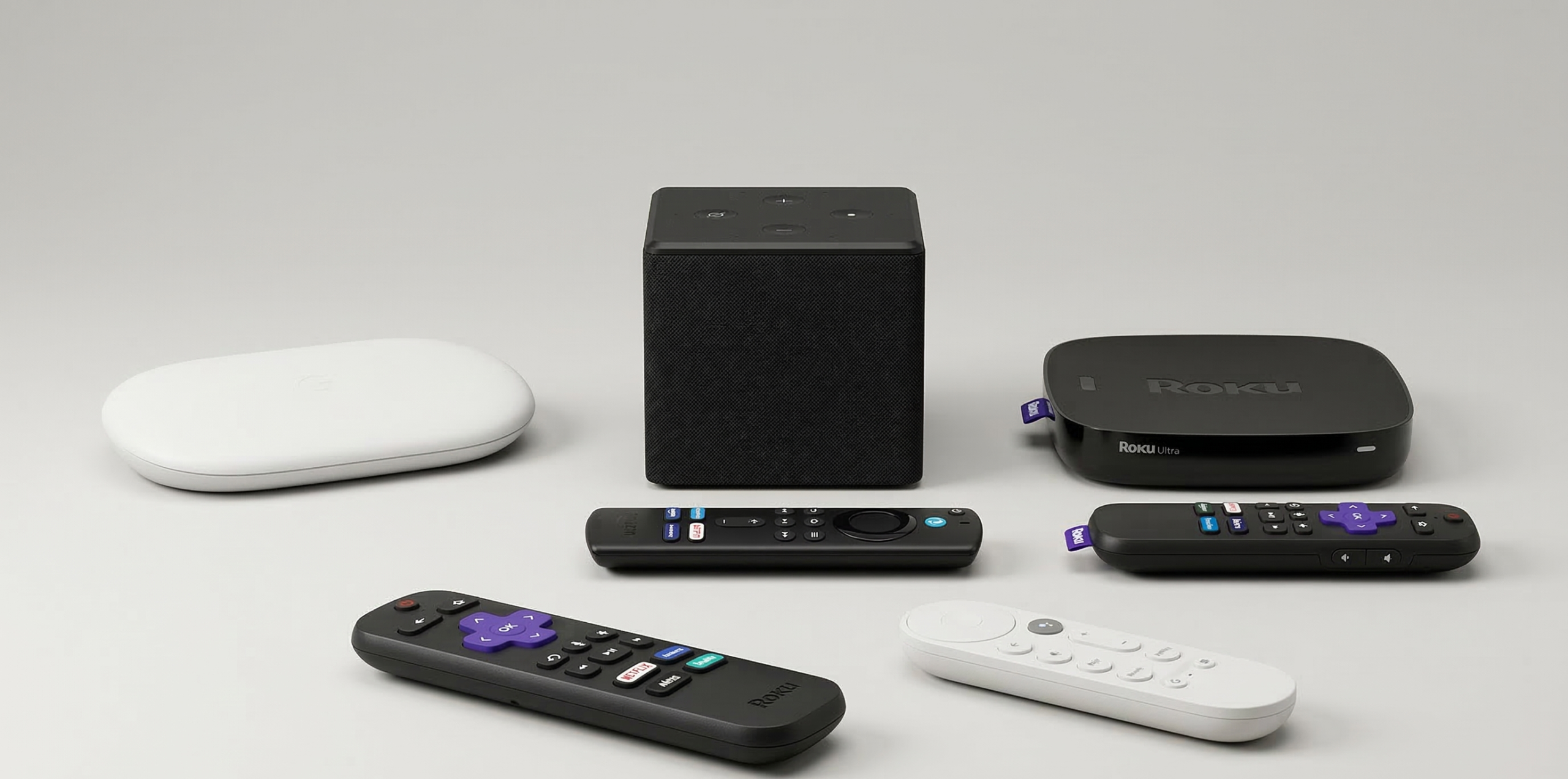
The days of just “plugging in a box” are passed. When you choose between Roku, Amazon Fire TV, and Google TV, you are not just purchasing hardware; you are also committing to a software ecosystem that will determine how you discover content, how much data is collected from your living room, and how well your smart home works with your television.
As someone who has handled multi-device setups for years, ranging from high-end home theaters to simpler senior living configurations, I’ve witnessed the evolution of these platforms from simple app launchers to aggressive, AI-driven recommendation engines.
Choosing the “best” one necessitates looking beyond the $30 price tags and comprehending the technical trade-offs in speed, privacy, and ecosystem lock-in.
The “Simplicity” Spectrum: Interface Philosophies
Every streaming platform has a “personality.” How you interact with your TV daily depends on which philosophy aligns with your mental model of entertainment.
Roku
Roku remains the “Switzerland” of streaming. Its interface is remarkably static: a grid of apps (Channels) on the right and a simple menu on the left. It does not care if you watch Netflix, Hulu, or Sling; it simply provides the door to those services.
- Who it’s for: Seniors, tech-averse users, and purists who hate being “sold” content on their home screen.
- The Experience: It is “clicky” and predictable. The remote uses large, rubberized buttons that provide tactile feedback.
Google TV
Google TV (found on the Chromecast and the new Google TV Streamer) is the polar opposite of Roku. It uses deep-learning algorithms to pull movies and shows from all your subscriptions into a single “For You” tab.
- The Technical Edge: Google hones its Virtual Assistant using Natural Language Processing (NLP), allowing for complex queries like “Find me 90s sci-fi movies available on my subscriptions”.
- The Trade-off: The interface is heavy. In recent testing, Google TV menus have been noted to “stick” or lag, even on higher-end hardware.
Amazon Fire TV
Fire TV is built around the Amazon ecosystem. If you are a Prime member, the integration is seamless. However, the interface is notoriously ad-heavy, often dedicating the top 30% of the screen to sponsored content or Amazon Originals.
- Side-loading Power: For enthusiasts, Fire TV’s Android-based roots allow for “side-loading” apps not found in the official store, such as specialized media servers or retro-gaming emulators.
Performance Benchmarks: Speed is a Feature
Many buyers ignore the processor and RAM, but in streaming, speed is the difference between instant gratification and a spinning loading circle.
App Load Time Comparison (Seconds)
Based on comparative testing of flagship 2024/2025 models:
| App | Roku Ultra (2024) | Google TV Streamer | Amazon Fire TV Cube (3rd Gen) | Apple TV 4K (2022) |
| Netflix | ~10s | ~15s | ~1s | ~1s |
| YouTube | ~6s | ~6s | ~4s | ~2s |
| Disney+ | ~9s | ~7s | ~5s | ~4s |
| Sling TV | ~8s | ~19s | ~14s | ~12s |
Note: While the Apple TV 4K remains the speed king, the Fire TV Cube’s octa-core processor makes it the fastest in the “Big Three” budget-adjacent category.
The Privacy Problem: ACR and Tracking
Privacy is the most overlooked factor in the streaming wars. Most modern devices use Automatic Content Recognition (ACR). This technology takes “snapshots” of what is on your screen, even if you’re using a Blu-ray player or game console connected to the TV, and sends that data back to the manufacturer to build an advertising profile.
- Roku and Fire TV: These platforms are heavily subsidized by ad revenue. Their business models rely on knowing what you watch. While you can opt out of some tracking, the controls are often buried deep in the settings.
- Google TV: Google harvests data to improve its recommendation engine. If you are already “all-in” on the Google ecosystem, this might feel like a fair trade for better personalization.
- The Privacy Alternative: If privacy is your primary concern, the Apple TV 4K is the industry outlier. It does not use ACR and allows users to disable Siri and location tracking during initial setup easily.
Smart Home Integration: The Hub vs. The App
Your streaming device is no longer an island; it is increasingly the brain of your living room.
The Matter/Thread Evolution
The newest generation of streamers (Google TV Streamer and Roku Ultra 2024) now includes Thread border routers. This allows them to talk directly to smart home devices like lights and locks without needing an extra hub.
- Google TV Streamer: Features a dedicated “Home Panel” that lets you view Nest camera feeds or dim the lights without stopping your movie.
- Fire TV Cube: Acts as a hands-free Alexa speaker. You can say, “Alexa, play The Boys,” and the TV will turn on and start the show without you touching the remote.
- Roku: Offers limited integration with Roku-branded home cameras, but lacks the deep, multi-brand ecosystem support found in Google or Amazon.
Common Pitfalls: Why Your “Fast” Stick Got Slow
One of the most frequent complaints is that a streaming stick becomes “unusable” after 18 months. This is rarely a hardware failure; it is usually a resource management issue.
- Storage Bloat: Budget sticks (like the Roku Express or basic Fire Stick) often have only 4GB to 8GB of storage. Once you install 10+ apps, the device lacks the “breathing room” (cache) to run smoothly.
- Power Supply Issues: Many users plug the USB power cable into the TV’s USB port. These ports often provide insufficient amperage, leading to random restarts and sluggish menus. Always use the included wall outlet adapter.
- Wi-Fi Interference: If your device is a dongle hidden behind the TV, the TV itself acts as a massive metal shield for Wi-Fi signals. Look for devices with “long-range Wi-Fi receivers” or use an HDMI extender to move the stick away from the back of the set.
Strategic Recommendations: Which One Should You Buy?
The “I Just Want to Watch TV” Option: Roku Ultra (2024)
If you want the best possible experience without joining a “tech cult,” the Roku Ultra is the winner. It is fast, includes a rechargeable remote with a “lost remote finder” beep, and stays out of your way.
The “Android Power User” Option: Google TV Streamer
If you use Google Photos, have a Nest doorbell, and want a TV that “knows” you, this is the pick. The 32GB of storage is the highest in its class, ensuring it won’t slow down as quickly as cheaper sticks.
The “Budget Cord-Cutter” Option: Amazon Fire TV Stick 4K Max
For under $60, this is the most powerful “stick” form factor. It supports Wi-Fi 6 and offers the most flexibility for those who know how to side-load apps for specialized content.
Summary Checklist for Buyers
- Roku: Best for simplicity, seniors, and neutral content discovery.
- Google TV: Best for personalization, Google Home users, and AI-driven features.
- Fire TV: Best for Prime members, Alexa users, and those on a strict budget.
- Apple TV: Best for privacy, high-end speed, and the Apple ecosystem.
Frequently Asked Questions
Do I need a 4K streamer if I have a 1080p TV?
Yes. 4K streamers (like the Roku Streaming Stick 4K) have better processors and more RAM than their “HD” counterparts. Even on a 1080p TV, the interface will feel significantly smoother.
Can I use a Roku remote on a Fire TV Stick?
No. These remotes use proprietary Bluetooth or Wi-Fi Direct protocols. However, most modern streamers support HDMI-CEC, allowing you to use your TV’s original remote to control basic navigation on the streaming box.
Why is my Fire TV Stick showing so many ads?
Amazon’s business model is based on “Prime-centric” discovery. To minimize ads, you can go into the settings to disable “Interest-based ads” and “Video Autoplay,” but the sponsored rows on the home screen cannot be fully removed.